
Links on this page go to Amazon. As an Amazon Associate, techinterview.org may earn from qualifying purchases. Prices change often, so we show price ranges only; check the product page for today’s price.
A laptop flat on a desk puts the webcam at chest height, so the interviewer sees your ceiling and the underside of your chin. A stand raises the camera to eye level. The spec that matters most is lift height, roughly 5 to 7 inches for a seated adult, and whether that lift is fixed or adjustable.
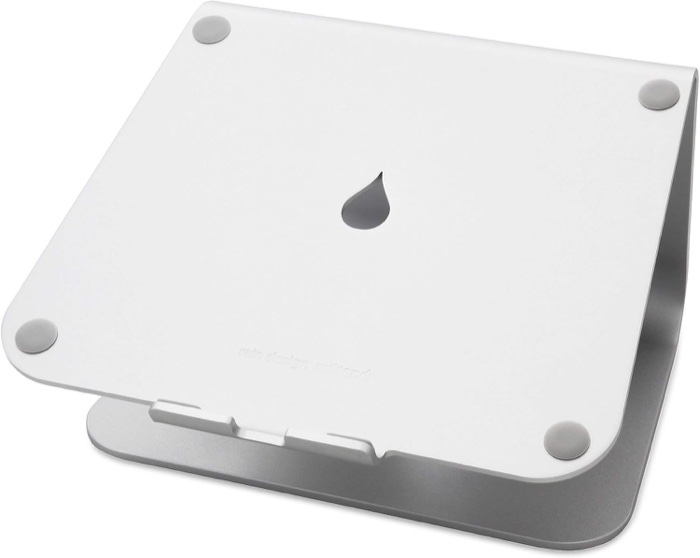
Rain Design mStand Laptop Stand (Silver)
Engineers with a permanent desk and an external keyboard who want a stand they never think about again.
Why we picked it. The mStand is one piece of aluminum with no hinges, so nothing loosens or sags. Reviewers quoted by Flexi Chair credit its zero moving parts with absolute stability, and Amazon's review summary across more than 11,000 ratings says it sits firmly and does not tip. It raises the screen 5.9 inches, which puts a 13 to 16 inch laptop's webcam at eye level for most seated adults, and the tilt brings the screen closer. A rear cable hole keeps the charger out of the shot. Pair it with an external keyboard; the space under the platform is designed to stash one between calls.
Flaws but not dealbreakers. Height is fixed, so shorter desks or taller users cannot fine tune it. The tilt and lift make typing on the laptop keyboard impractical, so budget for an external keyboard and mouse. It weighs about 3 pounds and does not fold, so it stays on the desk. Laptops deeper than 10.4 inches do not fit.
| lift height | 5.9 in (150 mm) |
|---|---|
| footprint | 10 x 7.5 in (253 x 190 mm) |
| weight | 3 lb (1.46 kg) |
| material | single-piece sand-blasted anodized aluminum, rubber pads |
| compatibility | laptops with depth under 10.4 in, including 16 in MacBook Pro |
| cable management | 2 in rear cable hole |
See on Amazon →availability and price range checked September 2026
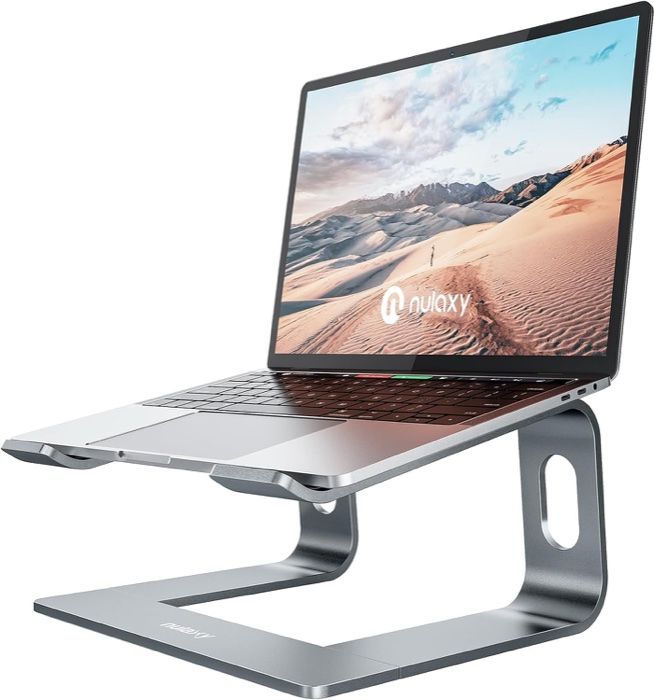
Nulaxy C3 Full Aluminum Laptop Stand
Anyone who needs the camera at eye level for the least money and already owns an external keyboard.
Why we picked it. The C3 is the cheapest stand that behaves like a real riser rather than a wedge: 5 mm aluminum plates that slot together in three pieces without tools, rubber pads top and bottom, and a lift of roughly 6 to 7 inches (Nulaxy says 7, Ergonomic Trends measured 6 with a 15 degree forward tilt). Ergonomic Trends called it the easiest stand to use out of the box, and Amazon's summary of more than 36,000 ratings describes it as sturdy and free of wobble with an external keyboard in play. It comes apart flat for a drawer, so it also works for an interview from a kitchen table.
Flaws but not dealbreakers. Nulaxy's own listing says the stand can be a little wobbly if you type on the laptop keyboard and recommends an external keyboard and mouse. Height and tilt are fixed. Ergonomic Trends listed a much lower practical load than the 22 pound figure Nulaxy advertises, so treat a heavy 17 inch gaming laptop as a stretch.
| lift height | about 7 in per Nulaxy; 6 in measured by Ergonomic Trends |
|---|---|
| tilt | 15 degrees forward |
| material | 5 mm aluminum alloy with rubber pads |
| stated load | 22 lb (10 kg) |
| compatibility | 10 to 16 in laptops |
| weight and assembly | about 1.75 lb (800 g); three pieces, no tools |
See on Amazon →availability and price range checked September 2026
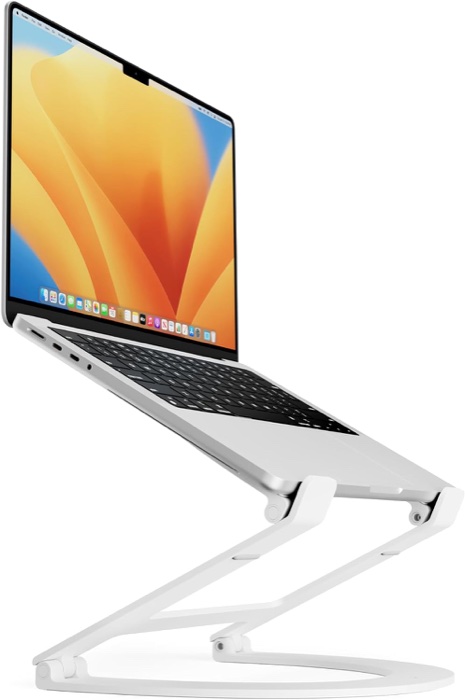
Twelve South Curve Flex Adjustable Laptop Stand (White)
People who type on the laptop itself and want one stand that goes from wedge to eye level.
Why we picked it. Two hex-tightened hinges let the base sit anywhere from 2 to 11 inches off the desk and tilt the keyboard from 0 to 45 degrees, so you can type at a low wedge angle for the coding round and raise it to eye level for the conversation. Coolsmartphone found it only moved when deliberately adjusted after several days of use, and The Newsprint found it does not wiggle or rattle once tightened, unlike the fixed original Curve. It folds to 1.18 inches, weighs 1.75 pounds, and ships with a neoprene sleeve, so it travels.
Flaws but not dealbreakers. The Newsprint reported the hinges sag with repeated adjustment and need retightening with the included hex key. Twelve South rates it for 7 pounds and laptops at least 8.66 inches wide; Amazon's review summary is mixed on stability, with some owners saying it will not hold a 16 inch model. It costs roughly twice what the fixed risers do.
| height range | base 2 to 11 in (30 to 274 mm) off the desk |
|---|---|
| keyboard angle | 0 to 45 degrees |
| weight | 1.75 lb (790 g) |
| folded size | 10.4 x 8.8 x 1.18 in |
| load and fit | up to 7 lb; laptops 10 to 17 in and at least 8.66 in wide |
| in the box | stand, neoprene travel sleeve, hex hinge tool |
See on Amazon →availability and price range checked September 2026
How to choose
Decide first whether you will type on the laptop during the interview. Fixed risers such as the mStand and Nulaxy C3 lift the screen about six inches at a tilt, which puts the camera at eye level but makes the built-in keyboard awkward and, on lighter stands, wobbly; plan on an external keyboard and mouse. If you want one device with no extra peripherals, pick an adjustable stand that folds nearly flat so you can type at a low angle and raise it only for the call. Ignore cooling claims. Check the weight limit against a 16 inch machine, and prefer rubber feet and a solid front edge over a folding arm if the stand will live on a desk. The common mistake is buying a tall riser and then coding hunched over a keyboard perched on it.
Set the height so the webcam lens is level with your eyes when you sit upright, then slide the stand back until your face fills the middle third of the frame. Put your main light (a window or a lamp) behind the camera rather than behind you, and mute when you are not speaking.
Also considered
- Rain Design iLevel2 Adjustable Height Laptop Stand Wirecutter's long-running pick for its front slider height adjustment, but Juan Monroy found his laptop bounced with each keystroke until he added an external keyboard, and it costs more than the mStand for the same basic riser job.
- Belkin iPhone Mount with MagSafe for Mac Notebooks The cheapest way to put a Continuity Camera iPhone at eye level on a MacBook lid, and SlashGear liked the image quality jump, but PetaPixel and Amazon owners report a weak magnet and a lid that tips back under the phone's weight, and it is Mac plus iPhone only.
Useful next steps:
