
Links on this page go to Amazon. As an Amazon Associate, techinterview.org may earn from qualifying purchases. Prices change often, so we show price ranges only; check the product page for today’s price.
A headset fixes the two things a laptop cannot: it puts a microphone a few centimeters from your mouth, and it keeps the interviewer's voice out of that microphone so the echo canceller has nothing to fight. The spec that matters most is where the mic sits, which is why a short boom or an inline capsule on a cable beats an array of tiny mics inside an earbud. Noise cancelling and battery life are secondary for a one hour call in a quiet room.
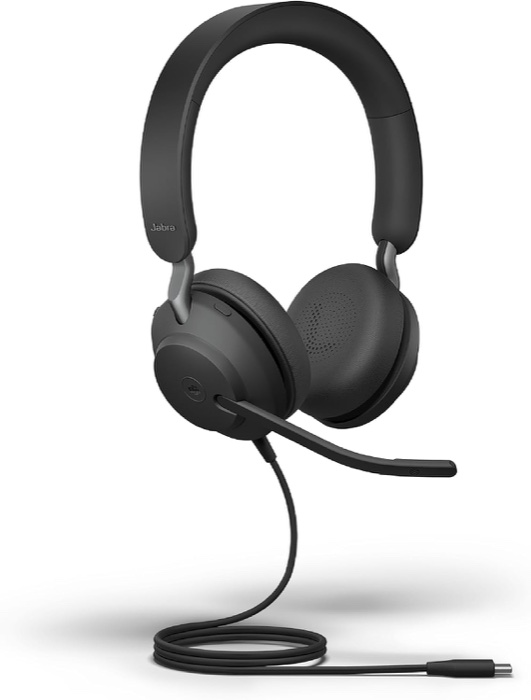
Jabra Evolve2 40 SE Wired Stereo Headset (USB-C)
Engineers who want a plug-in headset that sounds professional on every platform with nothing to pair or charge.
Why we picked it. Three MEMS microphones on a short boom put the capsule where it belongs, and reviewers at liGo and LatestinTech both described the result as natural, without the harsh electronic tone of cheaper corded headsets. It is a standard USB audio device, so macOS and Windows see a plain mic and speaker with no driver; Super Simple 365 found Windows set it as the default the moment it was plugged in. Lifting the boom mutes you, a busylight on each cup glows red during calls, and the on-ear cups keep the interviewer's audio out of your mic so the echo canceller has nothing to do.
Flaws but not dealbreakers. It has a call-center look, with a boom visible on camera. At 188 g it is heavier than the Evolve2 30, and Headsets.com says it is not a discreet headset. Super Simple 365 found the cable stiff, prone to kinks, and quick to transmit desk taps into the ear, and had to lower the sidetone in Jabra Direct. The Teams variant adds a button you may never press.
| microphones | 3 digital MEMS on a flip-to-mute boom, 100 Hz to 14 kHz |
|---|---|
| connection | USB-C cable, plug and play on macOS and Windows; USB-A variant sold separately |
| drivers | 40 mm |
| weight | 188 g stereo with cable |
| busylight | red LED on both ear cups, automatic during calls |
| in_the_box | headset, soft pouch |
See on Amazon →availability and price range checked September 2026
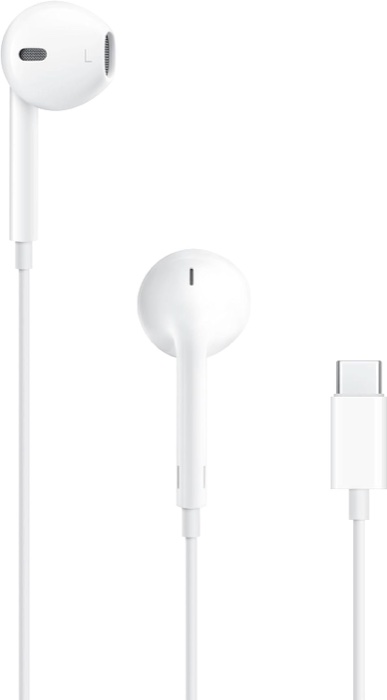
Apple EarPods (USB-C)
Anyone on a laptop with a USB-C port who wants a clear wired mic and nothing to charge.
Why we picked it. The inline microphone hangs on the cable a few inches below your mouth, which is why SoundGuys lists these as a phone-call pick and why Adam Talks Tech found the mic sounded clearer than the one in AirPods Pro 3 on the same calls. TechGearLab's testers heard voices stay clear in typical office noise. The USB-C plug is a standard audio device, so a Windows laptop, a MacBook or an Android phone sees it with no setup, and the wire means zero latency and no lip-sync drift. On camera they read as ordinary white earbuds rather than a headset, which some candidates prefer.
Flaws but not dealbreakers. No isolation at all, so a loud room leaks into your ears and, at high levels, the mic. The hard shell fits some ears badly and TechGearLab's testers had them fall out. They occupy what may be the only USB-C port on your machine. Music sounds thin, and the glossy cable tangles.
| microphone | single inline capsule on the cable below the right earbud |
|---|---|
| connection | USB-C plug with digital audio, no adapter needed |
| controls | inline remote for volume, play, and answering calls |
| weight | about 32 g per the Amazon listing |
| compatibility | Mac, Windows, Android and iPad with a USB-C audio port |
See on Amazon →availability and price range checked September 2026
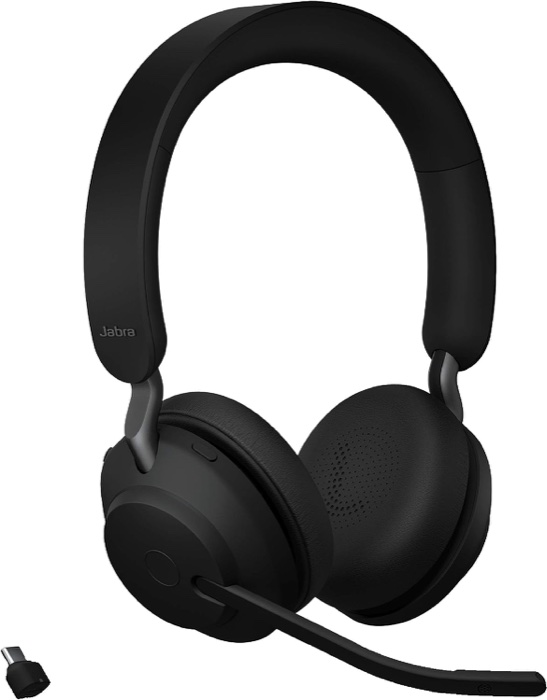
Jabra Evolve2 65 UC Stereo Wireless Headset with Link 380c
People who interview and take calls all day and want a wireless headset that still sounds wired.
Why we picked it. The Link 380 USB dongle in the box connects the headset to macOS or Windows without touching the computer's Bluetooth settings, which is the reason to pick this over consumer earbuds. RTINGS rated the recording quality and noise handling very good and called the boom mic high quality at isolating speech from background noise; Headset Advisor's mic test found it filtered office noise well. The boom flips up to mute, a busylight warns the household, and a 37 hour battery with an 8 hour top-up from a 15 minute charge means it is never dead before a call. Multipoint keeps your phone paired for the recruiter callback.
Flaws but not dealbreakers. SoundGuys found the clamping force and 176 g weight uncomfortable after about an hour and thought it overpriced against newer rivals. RTINGS measured high Bluetooth latency on PCs when you skip the dongle, and poor audio over a plain USB cable when the mic is active, so use the dongle. Jabra's Evolve3 65 replaces it this month, so buy whichever is in stock from a first-party seller.
| microphones | 3 digital MEMS on a flip-to-mute boom, 100 Hz to 8 kHz |
|---|---|
| connection | Bluetooth 5.0 plus Jabra Link 380 USB-C dongle (USB-A variant available); 2 simultaneous connections |
| battery | up to 37 h music, 35 h talk with busylight off; 8 h from a 15 minute charge |
| range | up to 30 m with the dongle |
| weight | 176.4 g stereo |
| in_the_box | headset, Link 380 adapter, 1.2 m USB-C to USB-A cable, soft pouch; charging stand on some SKUs |
See on Amazon →availability and price range checked September 2026
How to choose
Look for a wired USB connection first. A cable has zero latency, no pairing step, and avoids the Bluetooth call mode that Windows and macOS drop into when a wireless mic is active, which Microsoft's own support forum ties to degraded audio. Then look at where the mic sits: a boom arm or an inline capsule near your mouth will beat an earbud array in a quiet apartment. Check that the box says UC or Teams certified; both kinds work with Zoom, Meet and CoderPad. Ignore driver size, codec lists and active noise cancelling, which does nothing for how you sound. The common mistake is buying flagship earbuds for their music quality and then finding out that the mic path on a PC is the weak link. Do a test call with a friend before the real one.
Pull the boom down to about a finger's width from the corner of your mouth, not in front of it, so plosives do not pop, and flip it up to mute while the interviewer reads a long problem statement rather than hunting for a button. Before the call, make a 30 second recording in QuickTime or Voice Recorder to confirm the laptop picked the headset mic and not the built-in one.
Also considered
- Apple AirPods Pro 3 RTINGS rated the mic mediocre because the good processing only shows up with an Apple device, so a Windows interview loop gets the weaker version.
- Jabra Evolve2 30 SE Wired Stereo Headset (USB-C) Wirecutter's wired pick, sold by Amazon and lighter at 125 g, but it drops to two mics and this brief could not reach a second full review to confirm call quality.
Useful next steps:
