
Links on this page go to Amazon. As an Amazon Associate, techinterview.org may earn from qualifying purchases. Prices change often, so we show price ranges only; check the product page for today’s price.
Wi-Fi is the most common reason a candidate freezes mid-answer, and the fix costs less than lunch: a wired Ethernet link from your laptop to the router, plus a small battery backup so a two-minute power blip does not drop the call. The one spec that matters is gigabit (10/100/1000) with driverless operation on macOS and Windows; anything slower or that needs a driver download is a bad trade.
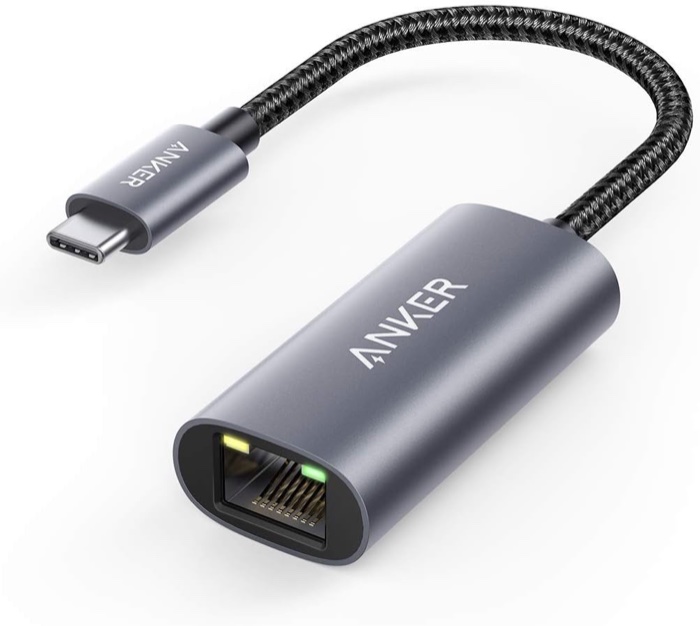
Anker USB-C to Ethernet Adapter (PowerExpand, model A83130)
For anyone with a USB-C laptop who wants a wired connection that just works on Mac and Windows.
Why we picked it. Reviewers at Virtual-PC measured 945 Mbps sustained on a gigabit line and found it plug-and-play across macOS, Windows, ChromeOS and Android; Nerd Techy and eTechnophiles both list it as a top pick for the same reason, with no driver install on Windows 8 through 11 or macOS. It weighs 23 grams and is a bit over half an inch thick, so it lives in the laptop bag and does not dangle awkwardly on camera. For an interview, a wired link removes the Wi-Fi drops and jitter that make you freeze mid-sentence, and this adapter does that with zero setup.
Flaws but not dealbreakers. Virtual-PC noted the plug can sit loosely in some shallow USB-C ports, so avoid tugging the cable during a call. It tops out at gigabit, which is irrelevant for calls but matters if you pay for a multi-gig plan. It costs a few dollars more than near-identical UGREEN and BENFEI adapters.
| Speed | 10/100/1000 Mbps (gigabit) |
|---|---|
| Connection | USB-C (USB 3.0), short braided cable |
| Drivers | None needed on macOS, Windows 8/8.1/10/11, ChromeOS, Android |
| Size and weight | 3.94 x 2.05 x 0.55 in, 22.7 g |
| In the box | Adapter, welcome guide, 18-month warranty |
See on Amazon →availability and price range checked September 2026
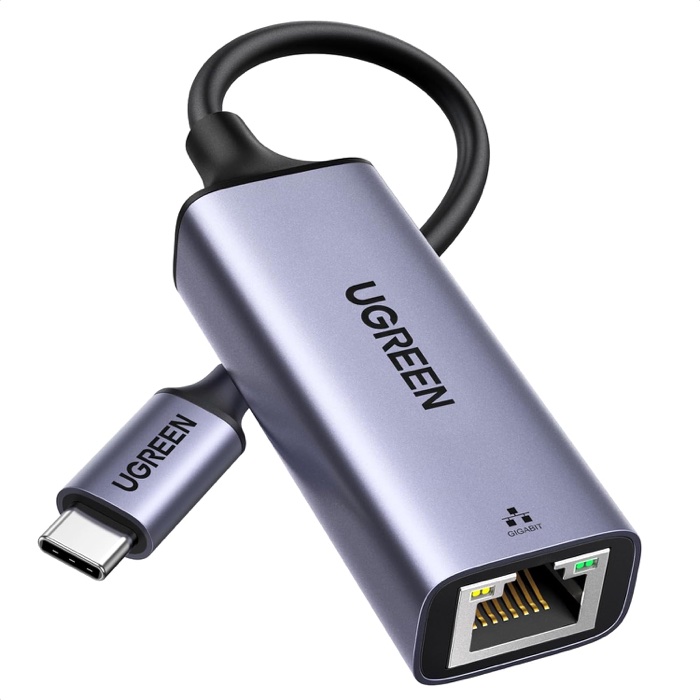
UGREEN USB-C to Ethernet Adapter (model CM199)
The cheapest gigabit adapter that still works without drivers on a Mac or a Windows laptop.
Why we picked it. eTechnophiles picked it alongside the Anker and noted it needs no driver on Windows 8 through 11, macOS, ChromeOS, iPadOS or Android, using the ASIX AX88179A chip that macOS supports natively. The Amazon listing says the same and lists macOS 10.15 as the minimum. Amazon sells it directly, and on the day of research it was the lowest-priced name-brand option. On a call, the outcome is identical to the Anker: a stable wired link instead of Wi-Fi, which is the whole reason to buy one. If you only need a spare for the bag or a second laptop, this is the one.
Flaws but not dealbreakers. UGREEN's own listing says Windows 7, XP and Linux need a downloaded driver, so it is not fully driverless on older machines. The status LED is bright, which Virtual-PC called out on the USB-A sibling. Fewer independent reviews cover this exact USB-C model than the Anker.
| Speed | 10/100/1000 Mbps (gigabit) |
|---|---|
| Connection | USB-C (USB 3.0, Thunderbolt 3/4 compatible) |
| Chipset | ASIX AX88179A |
| Drivers | None on macOS 10.15+, Windows 8/8.1/10/11, ChromeOS, Android; driver needed for Windows 7/XP and Linux |
| Weight | 30 g, aluminum shell |
See on Amazon →availability and price range checked September 2026
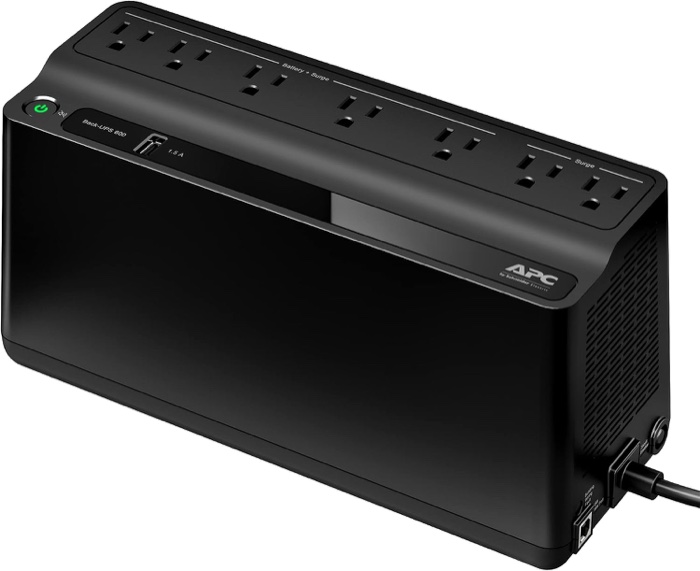
APC Back-UPS 600VA (BE600M1)
For people who interview or take calls all day and cannot let a power blip drop the internet.
Why we picked it. A UPS sits between the wall and your modem and router, so a power flicker never reaches the call. Reviewers at VoltageBasics tested the BE600M1 with a modem and router, which draw only 10 to 15 W together, and estimated several hours of runtime; WiredHaus made it their budget pick for home networks and noted that networking gear runs fine on its simulated sine wave. APC rates it for 23 minutes at a 100 W load, so adding a laptop charger still leaves margin. It has 5 battery-backed outlets, a user-replaceable battery, a 3-year warranty, and a plastic-strip form factor that hides behind the router.
Flaws but not dealbreakers. VoltageBasics noted the 330 W ceiling rules out a gaming desktop, a 10-hour full recharge, and beeping that you should silence in advance. WiredHaus flagged the lack of AVR and standby-only topology. The single 1.5 A USB port charges a phone slowly.
| Capacity | 600 VA / 330 W, standby topology, simulated sine wave |
|---|---|
| Outlets | 7 NEMA 5-15R: 5 battery + surge, 2 surge only; 1.5 A USB-A charging port |
| Runtime | 23 min at 100 W (APC rating); hours for a modem plus router |
| Battery | Sealed lead acid, user-replaceable (APCRBC154), about 10 h recharge |
| Size and weight | 10.79 x 4.13 x 5.47 in, 7.5 lb |
| In the box | UPS, USB cable, user manual; 3-year warranty, 490 J surge rating |
See on Amazon →availability and price range checked September 2026
How to choose
Buy a USB-C to gigabit Ethernet adapter that lists driver-free support for both macOS and Windows 10/11, so it works on your personal MacBook and the loaner ThinkPad. Ignore 2.5G and 5G adapters unless you pay for a multi-gig plan; a call uses under 5 Mbps and gigabit already has hundreds of times that headroom. Ignore aluminum versus plastic, LED colors, and Nintendo Switch support. Add a flat Cat6 cable long enough to reach the router without a tripping hazard. For the router and modem, a 600VA class UPS is enough, since together they draw roughly 25 to 40 W; simulated sine wave output is fine for networking gear. The common mistake is protecting the laptop but not the modem, so the laptop stays on while the internet goes dark.
Plug the adapter in and run the cable before the interview, then turn Wi-Fi off in the menu bar so the laptop cannot silently fall back to it. Keep your phone charged and next to the laptop as the last resort: iPhone and Android both share internet over the same USB-C cable you charge with, no extra accessory needed.
Also considered
- Jadaol Cat6 Flat Ethernet Cable, 25 ft, black (with clips) Not a substitute for a pick but the cable to buy with the adapter: flat 30 AWG Cat6 that runs under a rug or along a baseboard, sold by Amazon, and the top seller in its category.
- Belkin USB-C to Gigabit Ethernet Adapter (F2CU040, the one Apple's store carries) Same gigabit, plug-and-play spec as the Anker at roughly twice the price; buy it only if you are already in an Apple Store.
- CyberPower EC650LCD Ecologic UPS Compact and cheaper on sale, but CyberPower's spec sheet says the battery is not user-replaceable and rates only 8.4 minutes at half load.
- CalDigit TS4 Thunderbolt 4 Dock (2.5GbE) The right desk dock if you also need monitors and charging, but it is far over the budget for this guide and overkill for a call; CalDigit sells no standalone USB-C gigabit adapter.
Useful next steps:
