
Links on this page go to Amazon. As an Amazon Associate, techinterview.org may earn from qualifying purchases. Prices change often, so we show price ranges only; check the product page for today’s price.
A laptop's built-in camera sits below eye level, smears detail in anything but bright daylight, and makes you look like you are calling from a basement. An external USB webcam fixes the angle, the sharpness and the exposure in one plug. The spec that matters most is sensor size and lens aperture, because a bigger sensor with a fast lens is what keeps you clean and well lit after Zoom compresses the stream; resolution beyond 1080p matters far less than marketing suggests.
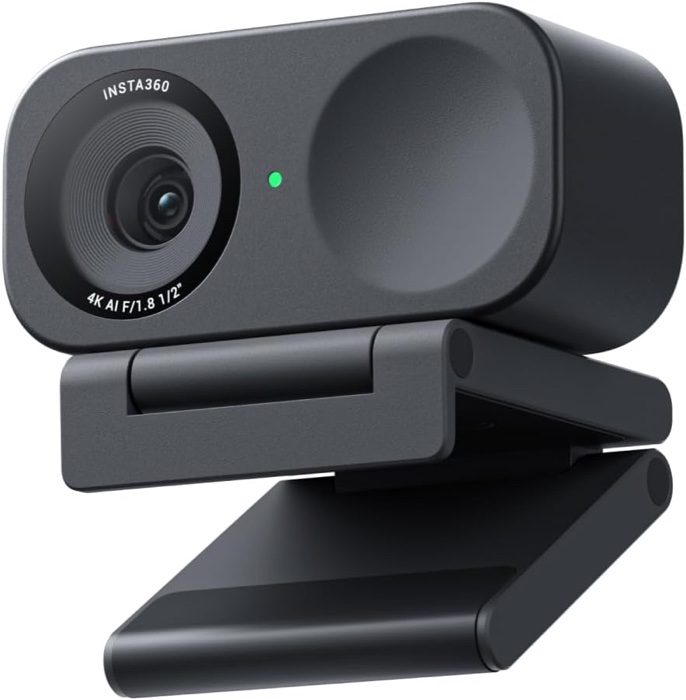
Insta360 Link 2C
For most engineers: a small 4K webcam that looks sharp on calls with no fuss.
Why we picked it. Tom's Guide named the Link 2C its best webcam overall in its August 2026 guide, and TechRadar and CGMagazine both recommended it, citing the same things: a 1/2 inch sensor with an f/1.8 lens, fast phase detection autofocus and facial detail that reviewers at CGMagazine found clearly beat the built-in cameras on a MacBook Pro M4 and a Razer Blade. For an interview that matters more than 4K: your face stays sharp and evenly exposed after Zoom compresses the stream. It is plug and play on macOS and Windows, mounts magnetically on a laptop lid or monitor, and a rocker switch covers the lens. Leave the gestures off.
Flaws but not dealbreakers. Reviewers at Tom's Guide and TechRadar found low light merely okay out of the box; enabling HDR in the free Link Controller app fixes most of it, so install it once. The built-in mic is clear but a little thin and compressed, and both outlets suggested an external mic. Zoom gestures misfire sometimes; disable them.
| Resolution | 4K at 30 fps or 1080p at 60 fps |
|---|---|
| Sensor and lens | 1/2 inch sensor, f/1.8, 26 mm equivalent, 79.5 degree field of view, phase detection autofocus |
| Microphone | Built-in dual mics with AI noise canceling and three voice modes |
| Connection | USB-C; USB-C to USB-A adapter included |
| Size and weight | 2.5 x 1.2 x 1 in, 3.9 oz with the magnetic L-mount |
| In the box | Webcam, magnetic mount, USB-C cable, USB-C to A adapter, four recognition markers; lens cover switch on the body |
See on Amazon →availability and price range checked September 2026
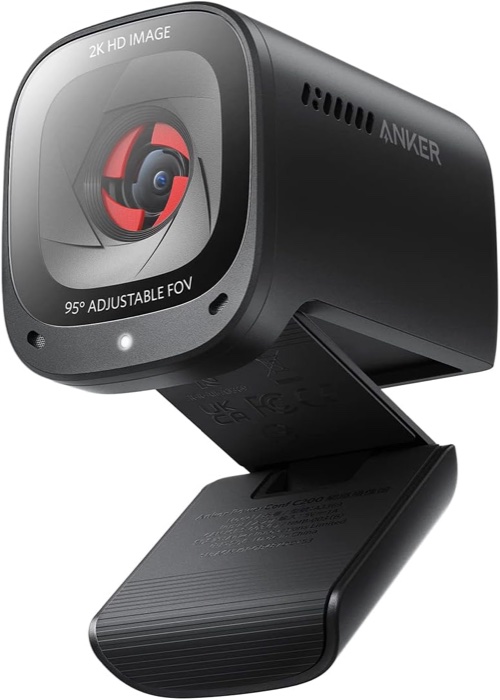
Anker PowerConf C200
The cheapest webcam that is clearly better than a laptop camera, with a built-in shutter.
Why we picked it. Tom's Guide (best budget pick, August 2026) and Engadget (best budget pick, February 2026) landed on the C200. Reviewers at Tom's Guide compared it on Zoom and Google Meet against an HP laptop camera and a Logitech C920s and found truer colors, sharper facial detail and better low-light handling than the laptop, plus dual mics that cut more background noise. The adjustable field of view (65, 78 or 95 degrees) lets you crop a small apartment out of the frame, which matters most at this price. It has a built-in sliding privacy shutter and a tripod thread, weighs under three ounces, and works on Windows and macOS without the app.
Flaws but not dealbreakers. Reviewers at Tom's Guide found the 2K image slightly grainier than a good 1080p camera and noted there is no swivel on the mount, no HDR and no auto framing. Engadget called the USB cable short and the camera fiddly to reposition on a monitor. Anker's app asks for an account; you do not need it to use the camera.
| Resolution | 2K (1440p), 1080p or 720p, all at 30 fps |
|---|---|
| Sensor and lens | 5 MP sensor, f/2.0 aperture, autofocus, 65 / 78 / 95 degree diagonal field of view |
| Microphone | Dual stereo mics rated to about 3 m, directional or omnidirectional pickup |
| Connection | USB-C cable included |
| Size and weight | 2.4 x 2 x 1.6 in, 2.9 oz |
| In the box | Webcam with built-in sliding privacy shutter and tripod thread, USB-C cable |
See on Amazon →availability and price range checked September 2026
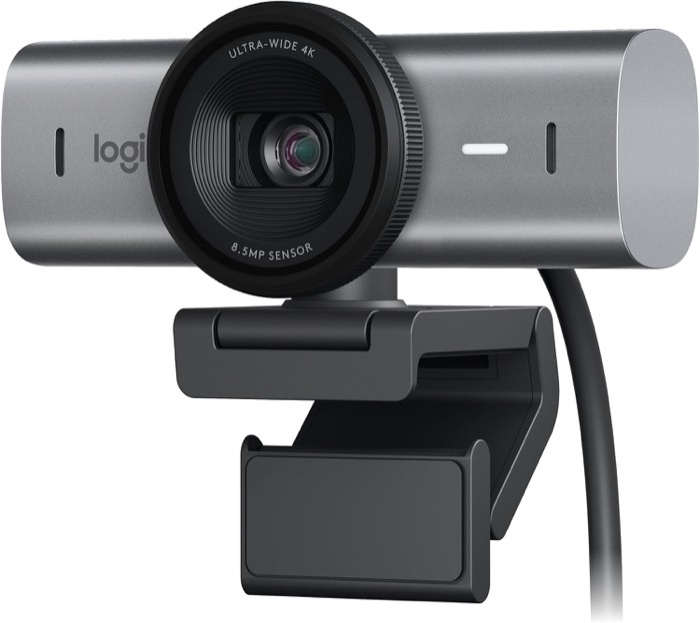
Logitech MX Brio Ultra HD 4K Webcam
For people on calls all day who want the cleanest image from a mainstream brand.
Why we picked it. PCMag gave the MX Brio its Editors' Choice for 4K webcams, TechRadar recommended it, and Tom's Guide picked the identical business version (MX Brio 705) as its best Logitech webcam. What sets it apart for interviews is exposure handling: reviewers at Tom's Guide sat with a bright window behind them and still came through evenly lit, with sharper detail and a wider frame than a MacBook Air's camera. PCMag called low-light performance strong. The 8.5 MP Sony Starvis sensor, f/2.0 lens, dial-operated privacy shutter and magnetic tripod-ready mount come with Zoom, Meet and Teams certification and driverless setup on macOS, Windows and Linux.
Flaws but not dealbreakers. It is heavy at 174 g and reviewers at Tom's Guide found it warm to the touch after 30 minutes and harder on laptop battery. PCMag and TechRadar both rated the dual mics as merely okay, and the Tom's Guide reviewer heard office keyboards through them. Show Mode for desk shots is awkward to position.
| Resolution | 4K at 30 fps or 1080p at 60 fps, 4x digital zoom |
|---|---|
| Sensor and lens | 8.5 MP Sony Starvis sensor, f/2.0 lens, autofocus, 90 / 78 / 65 degree field of view |
| Microphone | Dual beamforming mics with noise reduction |
| Connection | USB-C; USB-C to USB-C 3.0 cable included |
| Size and weight | 3.86 x 1.42 x 1.73 in, 174 g |
| In the box | Webcam with built-in privacy shutter, magnetic mount clip with removable adapter and 1/4 inch tripod thread, USB-C cable, documentation |
See on Amazon →availability and price range checked September 2026
How to choose
Look for a sensor of 1/2 inch or larger with an f/2.0 or faster lens, autofocus that locks quickly, and an adjustable field of view so you can crop out your apartment. A physical privacy shutter and a USB-C cable are worth having. Ignore 4K as a headline feature: every interview platform downscales to 1080p or below, so a 4K sensor helps mainly because it is larger and captures more light. Ignore streaming features like 60 fps, gimbals, gesture control and background replacement; you will not use them in an interview. The common mistake is spending on the camera and skipping light. Reviewers repeatedly found the same webcam looked mediocre in a dim room and excellent with a lamp in front of the face, so buy a desk lamp before you buy the upgrade tier.
Clip the camera to the top of your monitor or laptop lid so the lens sits at eye level, sit about an arm's length away, and put your main light source in front of you rather than behind you; a window at your back will turn you into a silhouette. Open the camera in Zoom or Meet the day before to confirm the interviewer sees the external camera, not the built-in one.
Also considered
- Obsbot Meet 2 Same 1/2 inch sensor class as the Link 2C in a smaller body, but reviewers at Tom's Guide and PC Gamer called the stand poor and the mic mediocre, and it ships set to 1080p.
- Elgato Facecam Neo A well-reviewed 1080p60 camera at a low price, but it has no microphone at all, so it only works if you already own a headset or USB mic.
- Obsbot Tiny SE PCMag's best 1080p pick, but the motorized pan-tilt gimbal is a streaming feature that draws attention on camera and adds nothing to a seated interview.
Useful next steps:
