
Links on this page go to Amazon. As an Amazon Associate, techinterview.org may earn from qualifying purchases. Prices change often, so we show price ranges only; check the product page for today’s price.
A laptop webcam in a normally lit room produces a grainy, muddy image because the sensor is starved for light, and Zoom's compression makes that worse. A small key light in front of you fixes more of your on-camera look than any webcam upgrade. The spec that matters most is a large, diffused, edge-lit panel that you can dim and warm to match your room, because raw lumens are not the problem at a desk.

Elgato Key Light Neo with Clamp
Engineers who want one small, plug-in USB panel with real buttons that looks right on a Zoom call.
Why we picked it. The Key Light Neo is a 150 mm edge-lit panel that runs off a USB port with no app required. Reviewers at PC Gamer scored it 91 and found soft, even, flicker-free light across warm and cool settings and every brightness level; Cubed3 gave it 9 out of 10 for cutting webcam grain and keeping colors consistent. Three buttons and a dial on the front handle power, brightness and color temperature, so you can adjust it mid-call without software on macOS or Windows. The clamp version adds a height-adjustable desk stand, so you can raise the panel above eye level and tilt it down to keep reflections out of glasses.
Flaws but not dealbreakers. Brightness depends on power: a laptop USB-A port gives about 400 lumens and you need a 12 W supply for the full 1000. Reviewers at Stream Tech Reviews found the phone and desktop app connection unreliable and the small panel harsh to look at when run at maximum a few feet from your face. Software is optional, so neither is a dealbreaker.
| panel | 150 x 150 x 38 mm edge-lit LED, 246 g |
|---|---|
| brightness | 400 lm on USB-A, 700 lm on USB-C, 1000 lm on a 12 W supply |
| color_temperature | 2900 to 7000 K, CRI above 94 |
| controls | On-device buttons and dial; optional Elgato Control Center over USB or Wi-Fi |
| power | USB-C on the light, USB-A to USB-C cable included, up to 15 W |
| in_the_box | Key Light Neo, desk clamp stand with height and tilt adjustment, USB cable and extension |
See on Amazon →availability and price range checked September 2026
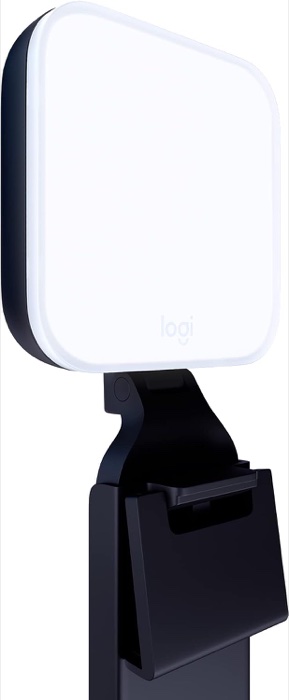
Logitech for Creators Litra Glow Premium LED Streaming Light
The cheapest light that clips to a monitor, takes no desk space, and beats a ring light on glasses.
Why we picked it. The Litra Glow is a 90 mm frameless diffused panel on a three-way monitor mount, powered by one USB cable, with a brightness dial on the unit. T3 gave it a Platinum award as a ring light alternative that keeps desk clutter down; GadgetGuy scored it 9.6 for lifting a face out of shadow on video calls. It adjusts across 2700 to 6500 K in five steps to match the lamps already in your room. For an interview it does the one thing that matters, a soft source in front of your face instead of a ceiling light behind you, for less than most ring light kits.
Flaws but not dealbreakers. At 250 lumens it is the dimmest pick here and cannot overpower bright overhead fluorescents, per GadgetGuy. The same review saw visible reflections in glasses, and Stream Tech Reviews found its shadows harsher than an edge-lit panel and the monitor clip less than secure. Logitech G HUB, which is optional, was described as buggy.
| panel | 90.5 x 90.5 x 27.5 mm frameless diffuser, 177 g without mount |
|---|---|
| brightness | 250 lm maximum, five brightness levels |
| color_temperature | 2700 to 6500 K, CRI 93 |
| mount | Three-way monitor mount with height, tilt and rotation; 1/4 inch thread adapter |
| power | USB, no battery; on-device brightness dial |
| software | Optional Logitech G HUB on macOS and Windows for presets |
See on Amazon →availability and price range checked September 2026
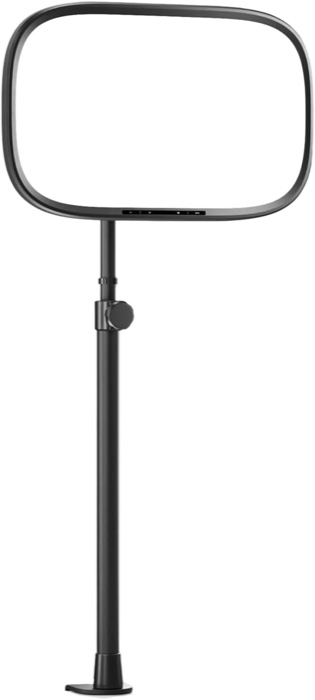
Elgato Key Light Air MK.2
For people on calls all day who want a large soft panel on a clamp, out of the way.
Why we picked it. The Key Light Air MK.2 is a 15 inch edge-lit panel with 256 LEDs behind several diffusion layers, and size is the point: a bigger source is softer on skin and gentler on glasses than any small monitor light. Reviewers at Basic Tutorials gave it a Gold award at 91 out of 100, noting no LEDs show through, webcam noise visibly dropped, and the original's Wi-Fi frustrations are gone since it pairs over Bluetooth first. Touch controls on the panel mean no app is needed. The clamp stand holds the panel 60 to 88 cm above the desk, freeing desk space and putting the light above eye level.
Flaws but not dealbreakers. No power adapter is in the box outside elgato.com, and on a computer USB-C port it produces roughly 400 lumens, so budget for a 30 W PD adapter to reach 2100. Basic Tutorials also noted the optional Focus Grid costs some brightness. At 735 g on a clamp it is a permanent desk fixture rather than something you tuck away.
| panel | 319 x 207 x 33 mm, 15 inch edge-lit, 256 LEDs, 735 g |
|---|---|
| brightness | Up to 2100 lm with a 27 W or higher supply; about 400 lm from a laptop port |
| color_temperature | 2900 to 7000 K, CRI above 94 |
| controls | Touch panel on the light with two presets; Control Center app over USB, Bluetooth or Wi-Fi 2.4/5 GHz |
| stand | Desk clamp for tops up to 6 cm, pole adjustable 60 to 88 cm, ball mount, three 1/4 inch threads |
| in_the_box | Panel, desk clamp mount, 250 cm USB-C to USB-C cable; power adapter sold separately |
See on Amazon →availability and price range checked September 2026
How to choose
Buy a panel that spreads light across a broad diffused surface rather than a bare LED array, since a soft source gives even skin and fewer shadows on a compressed call. You want brightness and color temperature both adjustable, at least a 2700 to 7000 K range, so the light can match a warm lamp at night or daylight from a window. Physical controls on the light beat app-only control; you will want to nudge brightness thirty seconds before a call starts. Ignore RGB modes, lighting effects, and streaming-app integrations. If you wear glasses, a monitor or clamp mount you can raise above eye level and tilt down matters more than any other feature. The common mistake is a ring light around the webcam: it reflects as a bright circle in your glasses and pupils and takes over your desk.
Put the light slightly above eye level and about 30 to 45 degrees off to one side of your webcam, not directly behind the camera, then dim it until your face is bright but not washed out; if you wear glasses, tilt the panel down toward you until the reflection slides out of the lenses. Turn off or block any window behind you first, because no desk light beats a backlit window.
Also considered
- Lume Cube Edge Light 2.0 LED Desk Lamp A very good 700 lumen, CRI 95 desk lamp that flips up as a video light, and Tom's Guide and How-To Geek both recommend it, but it is priced above the Key Light Air MK.2, has no on-panel readout, and the C-clamp fixes it in one spot, so it only wins if you also need a desk lamp.
- Logitech Litra Beam A 400 lumen bar on an adjustable stand that reviewers found easy to raise above glasses, but it costs about the same as the Key Light Neo with less output, has no on-device dial, and needs a 5 V 1.4 A supply for full brightness that most monitor USB ports cannot deliver.
- AiXPi 10 inch ring light with tripod stand The typical budget ring light that Digital Camera World picks as its cheap option; it is brighter than nothing but reflects as a ring in glasses and pupils, is sold by a third party rather than Amazon, and takes more desk space than the Litra Glow for the same money.
Useful next steps:
